Introduction
Quick3 offers an integration with the CitNow service so that shared customers may seamlessly check vehicles in and out of CitNow's application for creating service quotations, with more features coming in the future. Activating the integration is done by submitting a Support ticket, and as an active integration it incurs a monthly fee. You may contact our Support team for further information and/or to order the setup.
Please note that this integration requires a CitNow DealerID, and that you'll need to share this ID with our Support team when ordering. The Support team cannot assist in finding or procuring a DealerID for you.
Usage
When the integration has been activated and is ready to use on your client, you will find this new button on every block in the order view:
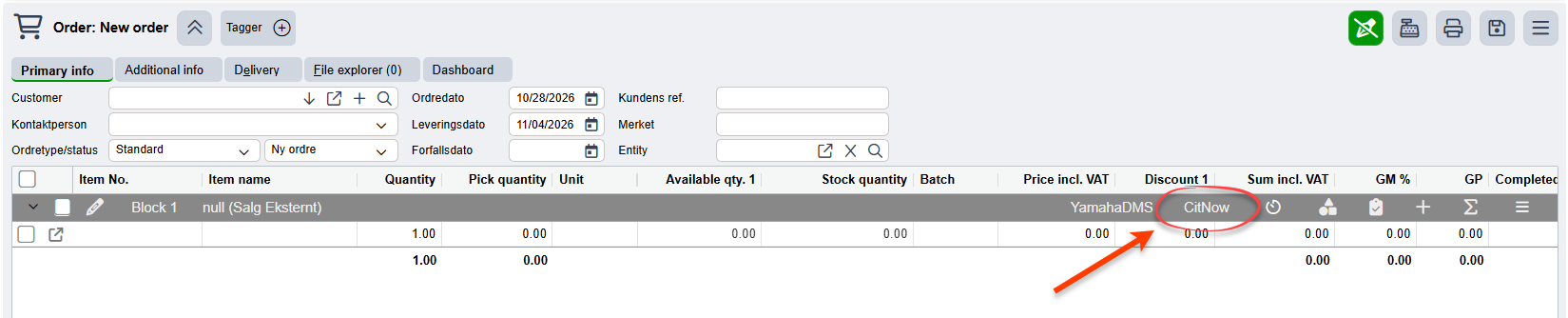
Once a customer has been added to the order, and an entity has been connected to the block, you can click this CitNow button in order to initiate the CitNow Check-In process for the vehicle. The following dialog box will appear when you click this button:
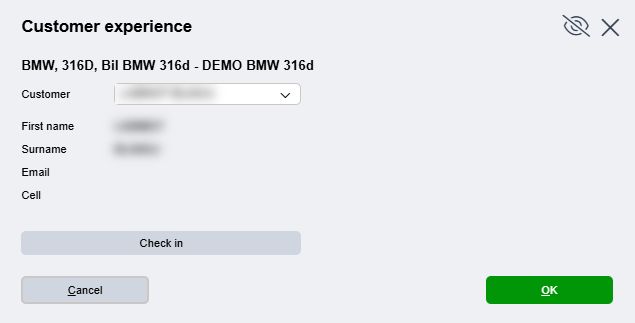
Ensure that the correct debitor (customer) is selected if you're handling an insurance case, and click "Check in". The vehicle and order information will be sent to your CitNow app, and the dialogbox in Quick3 will change into this:
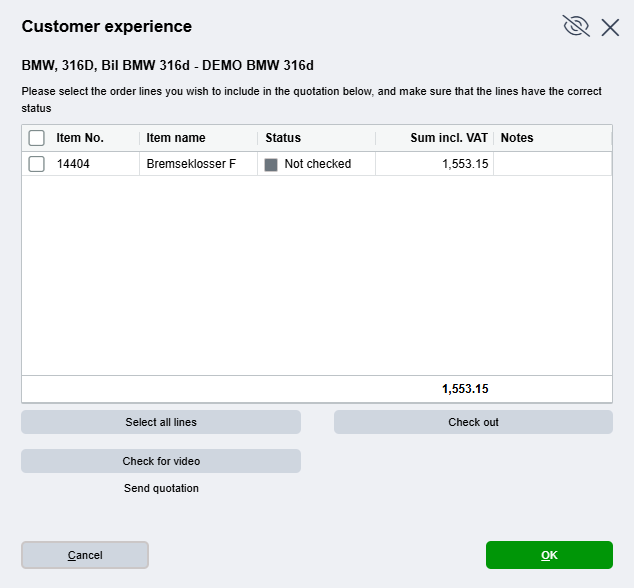
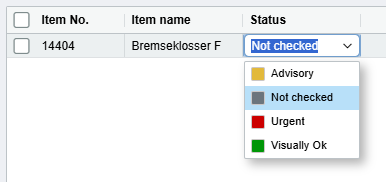
Here you can assign a "Status" to each of the other items you may have added to the order. Any notes added to the item line's Line text will appear in the "Notes" column of the table. The available statuses for each line are as follows:
Once you've assigned the proper statuses to each line, and you've finished uploading your video to the CitNow app, you need to click the "Check for video" button to make sure the quotation is ready to be sent. If Quick3 detects that the video has been processed, you will be able to send the quotation to the customer with the "Send quotation" button.
Videos can take a while to upload. If, for whatever reason, Quick3 can't detect an uploaded video despite it being finished processing in the CitNow app, please press Cancel in the dialog box and refresh Quick3 before opening the CitNow dialog box again.
At this point you may click "OK" and close the dialog box, and you can consider yourself done with the order in Quick3 until the customer confirms or rejects the quotation in CitNow. At which point you may make the necessary changes to send a new quotation, or complete the order.
Was this article helpful?
That’s Great!
Thank you for your feedback
Sorry! We couldn't be helpful
Thank you for your feedback
Feedback sent
We appreciate your effort and will try to fix the article